All Case Studies
Custom PlatformSeven Years in Production

A platform that has run their entire operation for seven years.

A bathtub reglazing and surface restoration contractor needed one system to manage jobs, properties, technicians, and billing. We built it, and it has been in daily production ever since.
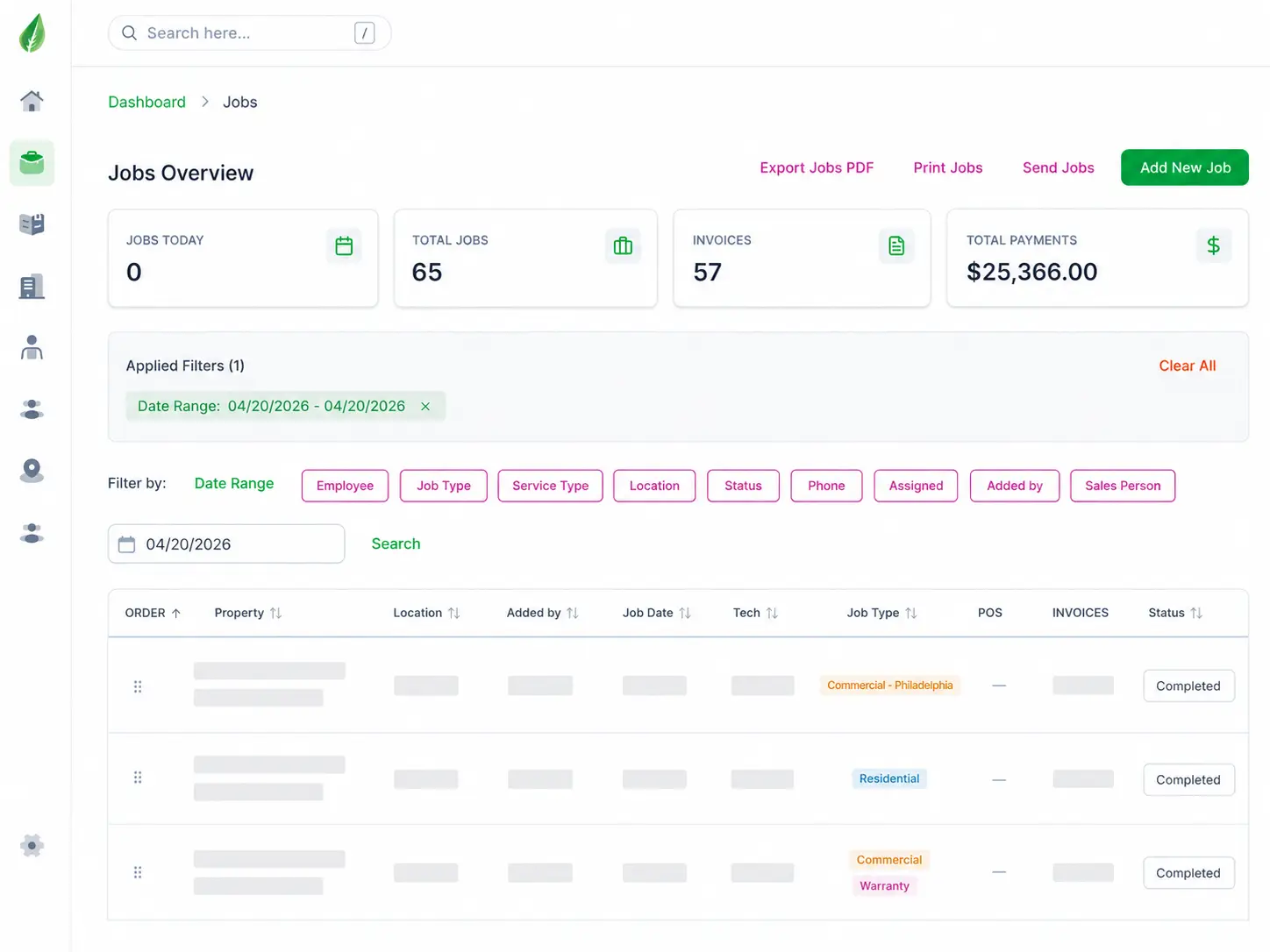

Jobs overview dashboard showing stat cards, filters, and the job table

80,638

Jobs processed

4,378

Properties managed

7

Years in continuous production

60

Active technicians

Built in 2019 and still in active daily use. Everglaze remains a client.

The Challenge

The work was growing faster than the paperwork could keep up.

Field service work generates a paper trail at every step. A job gets scheduled, a technician gets assigned, photos get taken before and after, an invoice goes out, and a warranty claim can come back two years later with someone needing to prove what was done.

Everglaze was running all of it on Microsoft Calendar and email. Job status lived in whoever had last touched it. Photos sat on technicians' phones. Finding the service history on a property meant asking around and hoping someone remembered.

The bottleneck was never the field work. It was knowing what had been done, by whom, and whether it had been paid for.

Sean Marsh
"We were running a business this size out of a calendar and an inbox. Seven years later every job, every property, and every photo is in one place, and I can answer any question a client asks me in about ten seconds. It runs the company."

Sean Marsh

Owner, Everglaze Coatings

Results

What changed.

MetricBeforeAfter
Job scheduling Microsoft Calendar Centralized job queue with full filtering
Job history Email threads 80,638 jobs on permanent record
Property records Ad hoc 4,378 properties with full service history
Field photos On technician phones Attached to the job record permanently
Invoicing Manual, separate Linked to jobs with balance tracking
Change tracking None Full audit log with user and timestamp
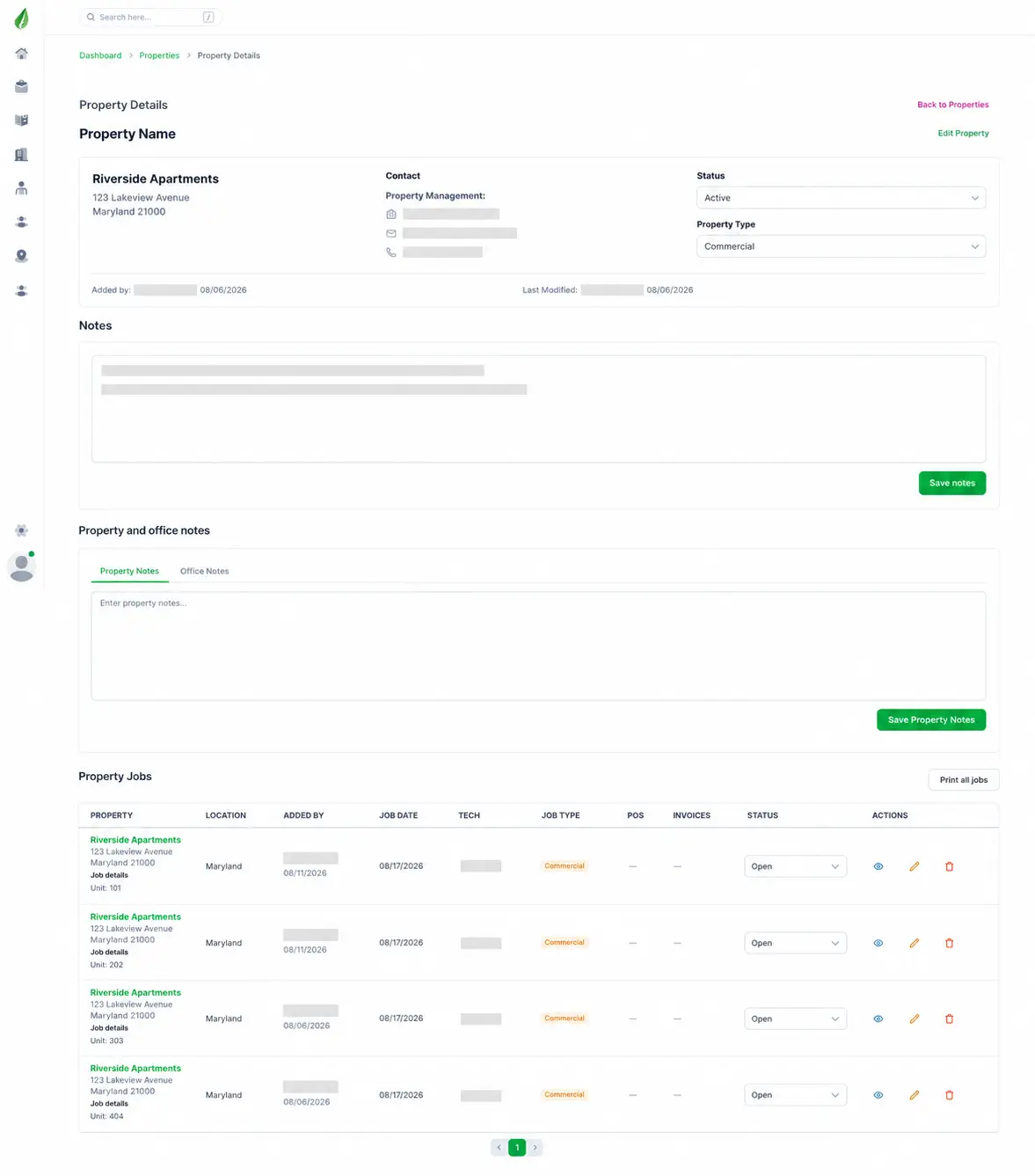
Property record screen showing property details, notes, and the full list of jobs performed at the address
A property record showing full service history across every job performed at the address.
What We Built

One system, eight modules.

  1. 01

    Job Management

    Every job in one queue with status, assigned technician, job type, service location, and linked invoice. Filterable by employee, job type, service type, location, status, date range, and assigned staff. Sortable on every column, exportable to PDF, printable, and sendable directly from the list view.

  2. 02

    Property Records

    Each property holds its full service history, so any new job pulls up everything performed at that address before it. Unit-level detail supports multi-unit properties, and property notes persist across every future visit.

  3. 03

    Technician Dispatch and Field Capture

    Jobs are assigned to technicians who work them from the field, uploading before and after photos directly to the job record. That photo evidence stays attached permanently, which is what makes a warranty claim resolvable years after the work.

  4. 04

    Warranty Tracking

    Jobs can be flagged as warranty work and tracked separately from standard commercial and residential jobs, so warranty volume stays visible rather than buried inside general job counts.

  5. 05

    Billing and Purchase Orders

    Invoices are created against jobs with total, paid amount, balance, and status tracked per invoice, plus purchase order records attached to the same job. The dashboard surfaces job counts, invoice counts, and total payments at a glance.

  6. 06

    Role-Based Notes and User Management

    Notes are segmented into property, technician, and office channels, so field instructions, internal notes, and property-specific requirements stay separate rather than collapsing into one shared field. User management controls who can see and edit what.

  7. 07

    Full Audit Trail

    Every change is logged with timestamp, user, action, originating IP address, and field-level detail showing exactly what changed and what it changed from, including status transitions and technician reassignments.

  8. 08

    Reporting and Exports

    Dashboard totals surface job counts, invoice counts, and payments at a glance, and any filtered view of the job list can be exported to PDF, printed, or sent directly from the platform. Reports reflect whatever filter is applied, so a property, a technician, or a date range can be pulled on demand.

Why It Holds Up

Every change has a name and a timestamp on it.

Field service work gets disputed. A property manager asks what was done. A warranty claim arrives two years after the job. A payment gets questioned. The platform answers all of it from the record: who was assigned, when the status changed, who changed it, what the technician photographed before and after, and what was invoiced. That traceability was a requirement from the first build, not something bolted on later.

What We Used

The stack behind it.

React Laravel MySQL Tailwind CSS

Let's talk about what you are trying to fix.

Every engagement starts with a conversation about how your operation actually runs. No pitch deck, no pressure.